For real estate photographers
Insert the card. Autosort files every shot.
Autosort matches every photo, video and drone clip to the booking on your calendar, then copies it into the right client folder the moment the card goes in.
Windows 10 and 11Mac before launchCopies only, never deletes
Works with
 Google Calendar
 Outlook
 iCloud


Reads cards from


 Insta360
Trademarks belong to their owners. Autosort isn’t affiliated with or endorsed by these companies.
How it works
Set it up once. After that, just insert cards.
Connect your calendar
Paste a private link from Google Calendar, Outlook or iCloud. Aryeo connects directly; HoneyBook and Dubsado work through the calendar they sync to.
Insert your cards
Camera, drone or both at once. Each property’s photos, video and aerials stay together.
Files land in client folders
Each shoot is copied into your folder layout in Google Drive, Dropbox, OneDrive or any local folder. A report shows what went where.
Inside the app
See exactly what Autosort will do.
Every screen shows the shoots it found, where each will go and why.
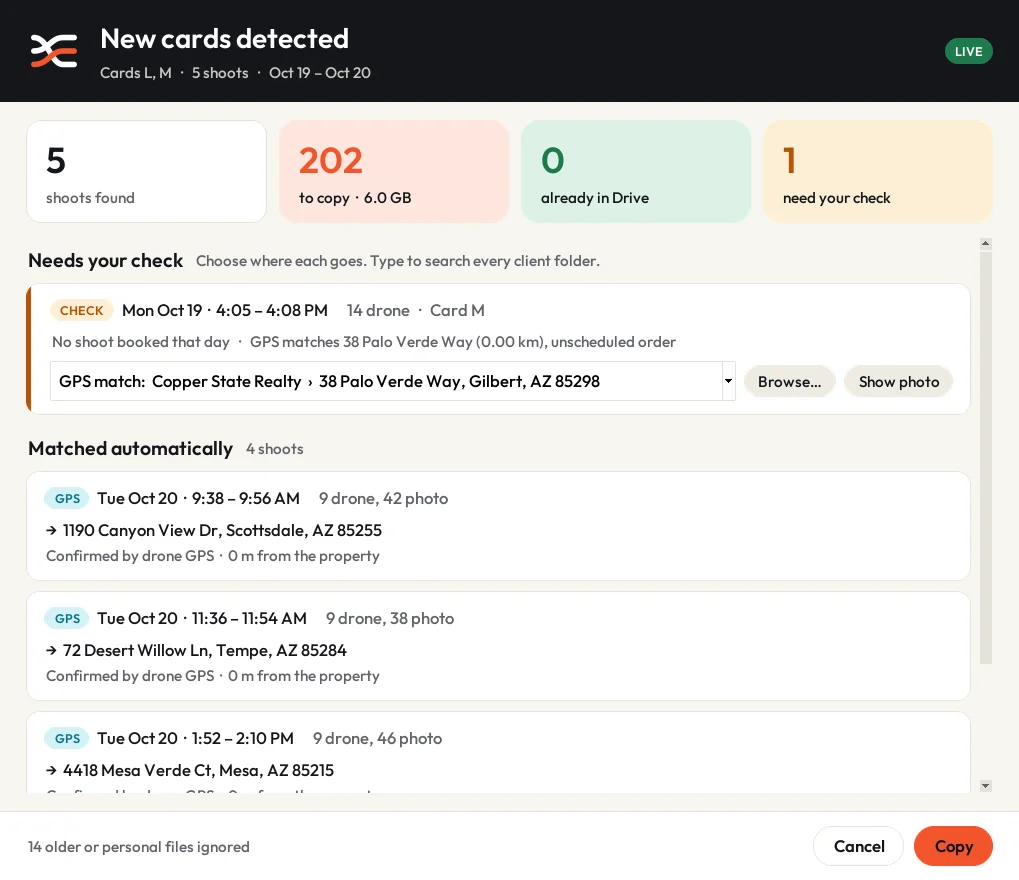
When a card goes in
Matched shoots are copied. Unclear ones wait for you.
Four shoots matched their bookings, confirmed by drone GPS. An unbooked flight waits for your check, with its likely property already suggested.
- GPS confirmed by the drone’s position
- Check your call, with a suggestion ready
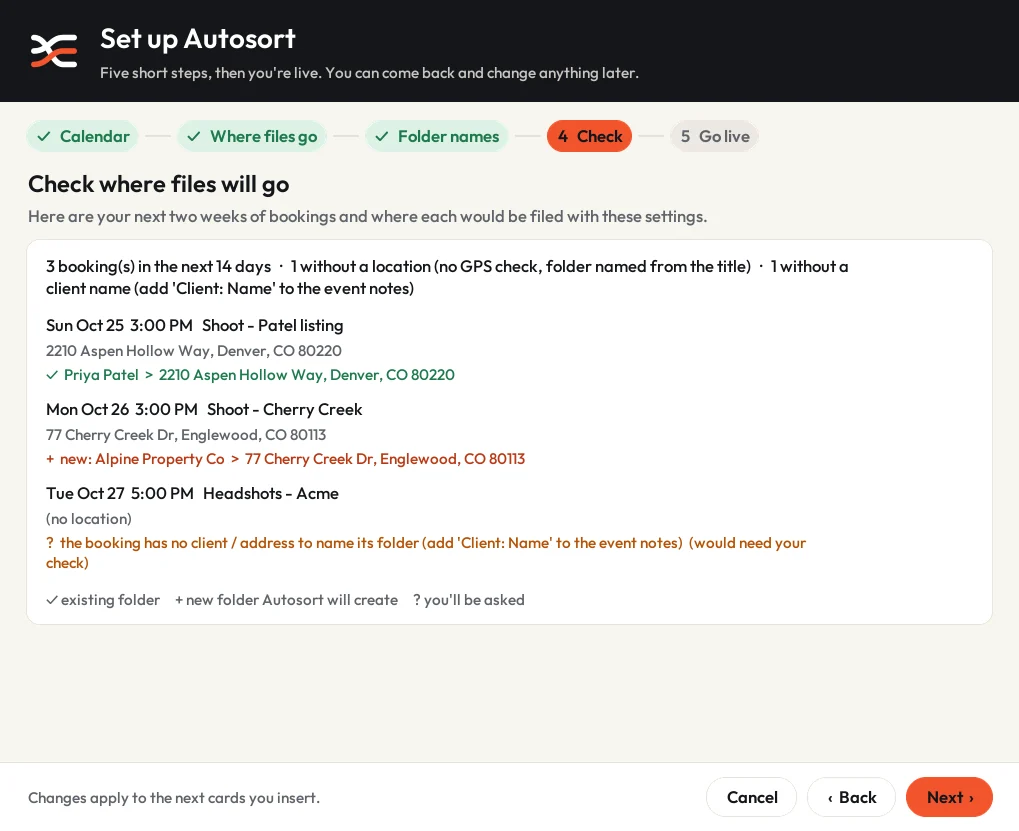
Before you go live
Preview where your next two weeks of shoots will be filed.
Setup ends with your real bookings and the exact folder each will land in, so you can adjust the layout before a single file is copied.
- ✓ an existing client folder
- + a new folder Autosort will create
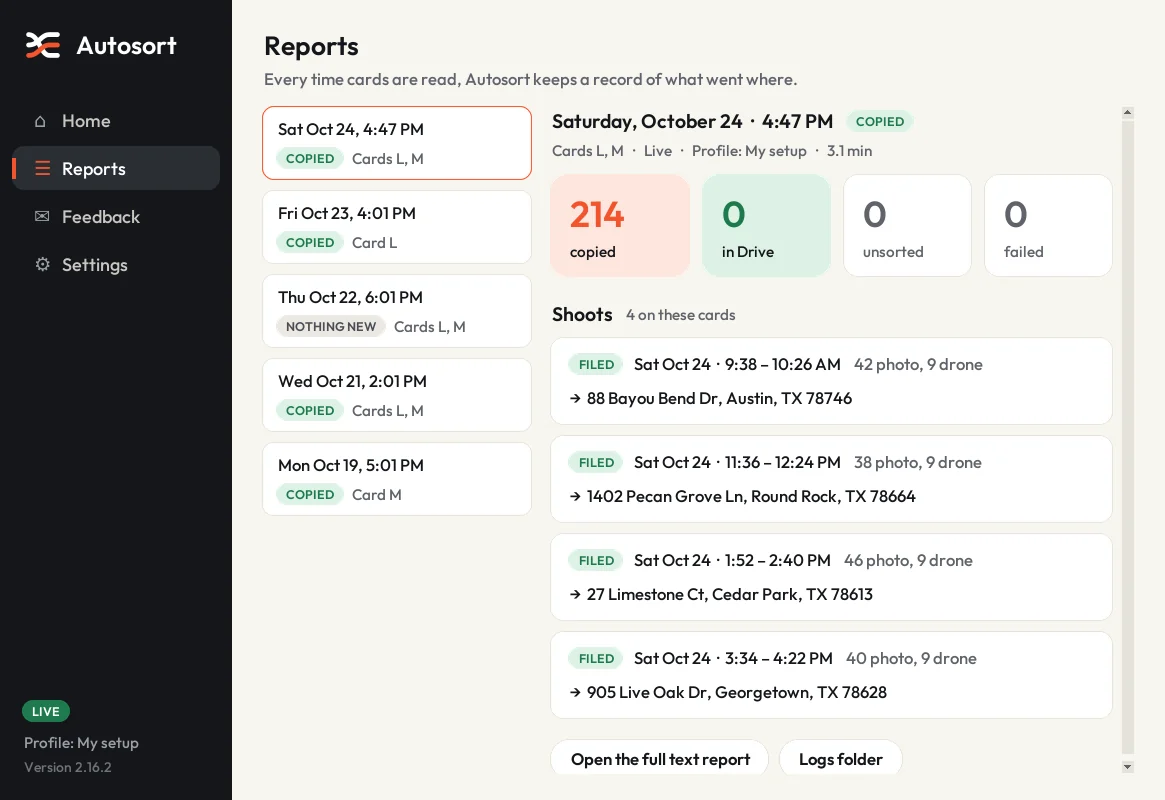
After every card
A report you can read in ten seconds.
Every card gets a record of its shoots, what was copied and where. Reports stay on your computer.
Screenshots show example clients and addresses.
Built around a shoot day
It sorts the way you already work.
Camera first, drone last, three properties before lunch. Built by a working real estate photographer for exactly that day.
Matched by time and place
Capture times are matched to your bookings, and drone GPS is checked against the property address before anything is filed.
Your folders, your names
Set your layout once, such as Clients › {client} › {address}, and name your Photo, Video and Drone folders. Missing folders are created for you.
Multi-day projects
A listing shot over two days, or a return visit for twilights, gets a dated folder per shoot day inside the same project.
Asks before it guesses
Unbooked shoots, back-to-back bookings and possible repeat visits come to you first. One click files them; nothing is filed on a hunch.
Copies only
Nothing on your card is ever deleted, moved or changed, and inserting a card twice never creates duplicates.
Every format you shoot
RAW, JPEG and HEIF photos plus common video formats, from mirrorless and DSLR cameras, drones and 360 cameras.
Free beta
Help shape Autosort before launch.
We’re inviting a small group of photographers to use Autosort on real shoots and tell us what to fix.
- Free for the whole beta, with updates installed automatically
- A direct line to the person building it
- Your feedback decides what comes next: more booking apps, more cameras, Mac
Requires Windows 10 or 11 (64-bit) and a calendar with your shoots on it. Mac testers: sign up and we’ll invite you when the Mac version is ready.
Questions
Before you sign up
Can Autosort delete or damage files on my cards?
No. Autosort only reads and copies. It never deletes, moves, renames or changes anything on a card. During the beta, keep your cards until you’ve checked the files arrived, as with any new tool.
What if a shoot isn’t on my calendar?
Autosort asks instead of guessing. If a drone clip’s GPS is near a property you’ve shot before, it suggests that property. Anything unconfirmed goes to that day’s Unsorted folder.
Do my bookings need an address?
No, time alone is enough to match a shoot. Adding the address is recommended: it lets Autosort name folders by address and confirm drone footage by GPS.
Where does my data go?
Your files go straight from the card to your folder and never pass through our servers. Your settings and calendar link stay on your computer, with the link encrypted. If an upload fails, Autosort sends us a short error report with client names, addresses and folder paths removed; you can turn that off. See the privacy policy.
Does it work with Google Drive, Dropbox or OneDrive?
Yes. Autosort copies into any folder on your computer, including folders those apps sync. Choose the top folder during setup and your client folders are built inside it.
Is there a Mac version?
Not yet. The beta is Windows-only; a Mac version is planned before public launch. Sign up and choose Mac to be invited first.
What will it cost?
The beta is free. We’ll announce pricing before the public launch, and beta testers will hear first.